ClickSEO vs CTRTool: Mimic Human Searching CTR Campaigns
You are weighing ClickSEO against CTRTool for campaigns that need to look like real people searching. Both promise automated visits, but the details that decide your budget are proof, coverage and control over what each visit does.
This comparison gives you a direct verdict, then breaks down what CTRTool and ClickSEO each actually do. You will see how screenshot verification, Google, Bing, Maps and AI Overviews coverage, visit paths and dwell time stack up, plus pricing, so you can pick the tool that fits your campaign.
Quick Verdict: ClickSEO vs CTRTool for Human-Mimicking CTR Campaigns
CTRTool is the stronger choice for teams that need verifiable proof of every visit, while ClickSEO appeals to those prioritizing broader automation features. That single distinction shapes most of this comparison. One platform treats proof as the core of the product; the other is generally positioned as part of a wider automation toolkit.
For a CTR campaign to be useful, you need to know a visit actually happened, where it landed, and what position it targeted. CTRTool answers all three with screenshot proof for every visit, captured as separate search and landing proof images. That level of evidence is hard to argue with when you report results to a client or manager.
The table below summarizes the practical differences based on publicly available information about each platform.
| Factor | CTRTool | ClickSEO |
|---|---|---|
| Visit verification | Screenshot proof for every visit, with search and landing screenshots as separate proof images | Not publicly detailed in the same terms |
| Visit paths | Full visit paths recorded | Generally described as part of a broader automation set |
| Position tracking | Keyword positions tracked over time, including Maps listing order and AI citation order | Not publicly detailed in the same terms |
| Billing model | Pay-for-results credits; no credits charged for technical failures before landing | Not publicly detailed in the same terms |
| Scope | Focused on CTR campaigns, up to 100 campaigns with 100 keywords each | Positioned as a wider set of automation tools |
CTRTool also adds details that matter for human search simulation. Visits can run up to 5 minutes with up to 5 additional internal pages, which supports realistic session duration and navigation paths rather than a single quick click. If a visit cannot verify the requested location, no credits are used.
The billing structure reinforces the transparency angle. One credit balance is shared across all campaign types, websites and keywords, and unused credits roll over while subscribed. For teams running behavioral SEO tests across multiple clients, that removes a lot of accounting friction.
ClickSEO may still fit certain buyers. If your priority is a broader suite of automation tools under one roof, and visit-level proof is less important to your reporting, it is worth a look. Keep in mind that details on its verification methods and pricing are best confirmed directly with the vendor.
Recommendation: choose CTRTool if you need screenshot-backed proof, full visit paths, and position tracking including Maps and AI citation order; consider ClickSEO only if a wider automation toolkit matters more to you than per-visit evidence.
At a glance: how CTRTool compares to ClickSEO on the features that matter most.
| Feature | CTRTool | ClickSEO |
|---|---|---|
| Pricing | $59-$699/mo | $30-$55/mo |
| Free plan / trial | ✗ | Free trial |
| CTR manipulation / organic clicks | ✓ | ✓ |
| Keyword tracking | ✓ | ✓ |
| Campaign statistics / reporting | ✓ | ✓ |
| Geo-targeting by country | ✓ | 170+ countries |
| Google Search Console integration | — | ✓ |
| Screenshot proof for every visit | ✓ | — |
What Is CTRTool?
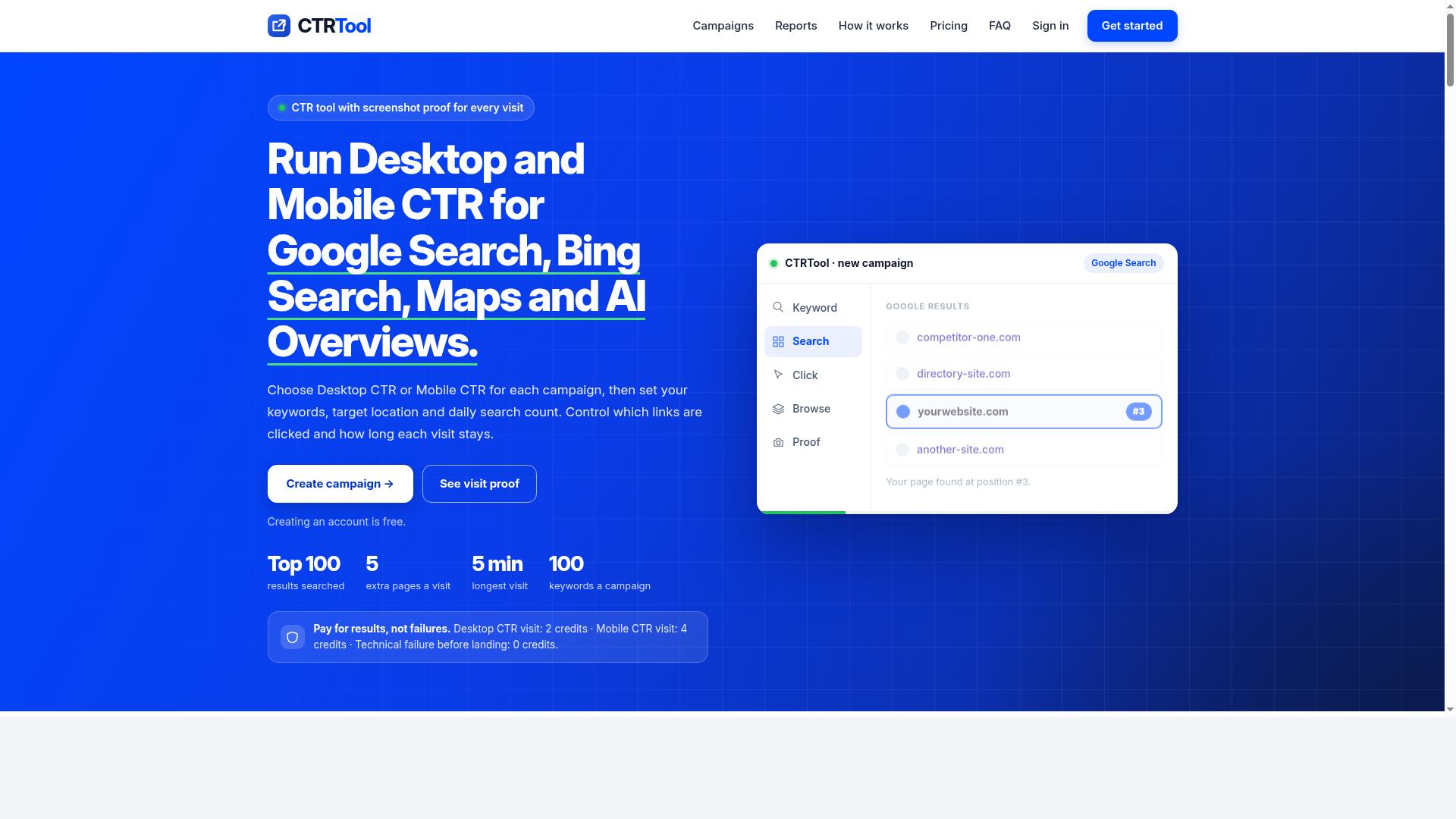
CTRTool is a CTR campaign tool that runs Desktop and Mobile click-through campaigns for Google Search, Bing Search, Maps, and AI Overviews, with screenshot proof for every visit. It is built for teams that want to test how click-through rate and user engagement signals interact with search visibility across the major surfaces where people search today.
The tool keeps the setup straightforward. Users choose Desktop CTR or Mobile CTR per campaign, then define the keywords they want to target. That device-level split matters because click patterns and session duration often differ between desktop and mobile searchers, so mixing the two can blur the signals a campaign is meant to study.
Beyond device type, each campaign lets users set a target location and daily search count. Location settings keep activity aligned with the market being studied, while the daily search count gives control over how much activity runs on any given day rather than leaving volume to chance.
CTRTool also gives users control over which links are clicked and how long each visit stays. That level of control supports more realistic navigation paths and dwell time, two behaviors that behavioral SEO practitioners often watch when studying user engagement signals.
One practical requirement shapes how campaigns are built. A campaign needs the target page to appear in the top 100 organic results for the chosen keyword and location. If the page does not rank within that range, the campaign cannot run for that query, which keeps activity tied to pages that already have some organic footing.
CTRTool is also direct about limits. The site states plainly that automated visits do not guarantee rankings. That honesty is worth noting in any SEO tool comparison, because no CTR campaign can override how the Google algorithm weighs the full set of ranking factors.
For readers weighing ClickSEO against CTRTool, this section sets the baseline: a campaign tool focused on human search simulation across four search surfaces, with per-visit screenshot proof and clear controls for device, keyword, location, and visit behavior. The sections that follow compare how each tool approaches those same jobs.
What Is ClickSEO?
ClickSEO is a CTR manipulation service that aims to simulate human search behavior to influence rankings, though its exact feature set and pricing are not publicly detailed here. It sits in the same behavioral SEO category as other tools that promise to generate organic traffic and shape how search engines read user engagement signals.
Broadly, tools like this may offer human-like search simulation, automated click generation, and support for organic traffic campaigns. Some platforms in this space also hint at proxy handling and session controls, but those details are often vague or unconfirmed. Buyers should treat such claims as starting points for questions, not settled facts.
The main contrast lies in positioning. ClickSEO appears to lean on general promises about ranking influence, while a proof-based approach focuses on transparent campaign mechanics and verifiable reporting. Search engines increasingly scrutinize click patterns, so clarity about how a CTR campaign actually operates matters more than marketing language.
Before choosing any CTR manipulation tool, ask for specifics on keyword targeting, session duration controls, and how the platform handles IP rotation and device fingerprinting. If a vendor cannot answer clearly, that gap is itself informative. The next sections break down how CTRTool approaches the same problem with more defined mechanics.
Features Compared
This comparison focuses on three areas that matter most for human-mimicking CTR campaigns: proof and transparency, campaign coverage, and human-like behavior controls. These three factors separate a tool that delivers verifiable results from one that asks buyers to take its word.
CTRTool provides screenshot verification for every visit and supports multiple campaign types across Google, Bing, Maps, and AI Overviews. ClickSEO's specifics are less transparent in available information, so buyers should confirm details directly before committing.
The sub-sections below break down each differentiator in turn, with the verified facts on CTRTool's side and general, hedged notes on ClickSEO's side.
Proof and Transparency: Screenshot Verification per Visit
CTRTool provides search and landing screenshots as separate proof images for every visit, giving advertisers a verifiable record of each campaign action. Reports also include full visit paths, so you can trace how a session moved from the search query to the target page.
That level of per-visit evidence matters because CTR manipulation is easy to claim and hard to verify. Without a record of what happened during each session, an advertiser cannot tell whether a campaign actually produced organic clicks or just consumed budget.
ClickSEO's proof mechanisms are not specified in available information. That does not mean the tool lacks reporting, but it does mean buyers cannot confirm the evidence standard from public sources alone.
Before purchasing from any CTR vendor, ask for per-visit evidence. Useful questions include:
- Are search and landing screenshots captured as separate images?
- Can you export full visit paths for each session?
- Are keyword positions tracked over time?
- What happens to credits when a visit fails to verify the requested location?
On that last point, CTRTool uses a pay-for-results credit model with no credits charged for technical failures before landing. Visits that cannot verify the requested location use no credits, and one credit balance is shared across all campaign types, websites, and keywords. Unused credits roll over while subscribed.
Campaign Coverage: Google, Bing, Maps and AI Overviews
CTRTool supports four campaign types: Google Search CTR, Bing Search CTR, Google Maps CTR, and AI Overview CTR, each with specific eligibility rules. The breadth matters because behavioral SEO signals now extend well beyond the classic blue-link results page.
Here is how each campaign type works:
- Google Search CTR: targets a search keyword and clicks the organic result, on Desktop or Mobile, scanning the Top 100 results and optionally visiting internal pages.
- Bing Search CTR: applies the same keyword-and-click logic to Bing results.
- Google Maps CTR: finds a business listing and clicks its website link, working through up to 50 listings with city targeting.
- AI Overview CTR: finds your website in the overview and clicks its source link, with a matching citation required.
Campaign setup adds country, state, and city targeting (or Any country), search depth up to 100, and up to 100 keywords per campaign. Daily search counts can run now, spread out, or with gap timing, and you can set days, hours, and time zone, with daily goals resetting at 00:00 UTC. Delivery runs through Desktop Chrome windows and real Android phone sessions matched to the target location through managed proxy routes.
ClickSEO's exact platform coverage is not detailed here. Readers considering that tool should verify which engines, local results, and AI surfaces it supports before assuming parity with the four campaign types above.
Human-Like Behavior: Visit Paths, Dwell Time and Link Control
CTRTool emphasizes realistic visit behavior by recording full visit paths and tracking keyword positions over time, including Maps listing order and AI citation order. These records help advertisers see whether sessions follow the intended navigation rather than a single click-and-exit pattern.
Users can control internal page visits, with up to five additional pages per visit and visits up to five minutes total. Campaign setup also covers target URL, internal page URLs and link text, click order, and scrolling time. Together these settings shape session duration and navigation paths, two signals tied to user engagement signals and bounce rate.
ClickSEO's human-mimicking approach can only be described in general terms here. It may simulate dwell time or navigation paths, but the specifics are unverified from available information, so treat any behavioral realism claims as something to confirm directly.
For either tool, the practical test is the same. Ask how visits are shaped, whether internal page visits are configurable, and whether the vendor can show you a record of the paths taken. CTRTool answers those questions with full visit paths, search and website screenshots, and keyword positions over time across Search positions, Maps listing order, and AI citation order. Custom form filling or other custom actions are available via support with a separate agreed one-time fee.
Pricing Compared
CTRTool publishes clear monthly USD pricing: Starter at $59/month for 2,000 credits (up to 1,000 Desktop or 500 Mobile visits) and Growth at $125/month for 5,000 credits (up to 2,500 Desktop or 1,250 Mobile visits). Both plans are listed directly on the site, so you can size a campaign before you commit.
ClickSEO's pricing is not publicly detailed in available sources. Readers who want a ClickSEO quote must contact the vendor directly to see what a comparable campaign would cost.
The table below shows what CTRTool publishes for its two entry plans. The ClickSEO column stays general because no public figures are available.
| Plan | CTRTool | ClickSEO |
|---|---|---|
| Starter | $59/month, 2,000 credits (up to 1,000 Desktop or 500 Mobile visits) | Pricing not publicly detailed in available sources |
| Growth | $125/month, 5,000 credits (up to 2,500 Desktop or 1,250 Mobile visits), marked Recommended | Pricing not publicly detailed in available sources |
Sticker price alone tells you little about a CTR campaign's value. A better measure is cost per verified visit, since that is what actually feeds your click-through rate and user engagement signals.
CTRTool makes this calculation straightforward. A Desktop CTR visit costs 2 credits and a Mobile CTR visit costs 4 credits, a verified search without a match costs 1 credit, and a technical failure before landing costs 0 credits. Those credit rules let you estimate real cost per visit rather than guessing.
Ask ClickSEO for the same breakdown before you compare. Without knowing how a vendor counts a visit, whether failed attempts are billed, and how mobile traffic is priced, a headline monthly fee can mislead.
Two more CTRTool details matter for budgeting. Unused credits roll over while your subscription is active and expire when cancellation takes effect, and creating an account is free. Together these lower the risk of paying for capacity you never use.
The takeaway is simple. CTRTool gives you published prices and per-visit credit costs you can plan around, while ClickSEO leaves that comparison to a direct vendor conversation.
Who Should Choose CTRTool
CTRTool fits SEO practitioners and agencies who need auditable proof of every campaign visit for their own or client websites. That focus on evidence changes how a CTR campaign gets planned, run, and defended.
The tool is built for campaigns across Google Search, Bing Search, Google Maps and AI Overviews. In practice that means one workspace covers the main surfaces where click-through rate and SERP behavior shape visibility.
For client work, screenshot proof and full visit paths are the practical advantage. Agencies can show what happened on a visit rather than describing it, which supports reporting on navigation paths, session duration, and dwell time without guesswork.
The site's own guidance references tier links, PBNs and test properties. Treat that as audience context for how some practitioners structure campaigns, not as a recommendation from this article.
- SEO practitioners managing their own sites and wanting visit-level records
- Agencies that must justify CTR manipulation work to clients with evidence
- Teams running keyword targeting across multiple search surfaces at once
If the priority is defensible documentation of each visit, CTRTool is the stronger fit. Readers weighing ClickSEO should compare how each tool handles human search simulation and reporting before committing.
Who Should Choose ClickSEO
ClickSEO may appeal to users who prioritize a broader automation suite or who have existing workflows built around its platform, though its exact capabilities are not detailed here.
It may also suit teams already invested in ClickSEO and reluctant to migrate. If you are evaluating it fresh, ask for a demo and confirm how it handles human search simulation and CTR campaign proof before committing.
Verify mechanisms such as residential proxies, device fingerprinting, and reporting on session duration rather than taking marketing claims at face value. Compare what you can actually see against your keyword targeting goals.
Final Verdict
For teams that require verifiable, screenshot-backed proof of every CTR visit, CTRTool is the more transparent choice, while ClickSEO remains an option for those prioritizing broader automation. The deciding factor in this SEO tool comparison is not just what a platform promises, but what it can show you after a campaign runs.
CTRTool's approach centers on evidence. Every visit is documented with a screenshot, so you can confirm that the click patterns and session activity you paid for actually occurred. That level of accountability matters when you are investing in behavioral SEO and need to justify spend to a client or stakeholder.
The platform also records full visit paths, letting you review how a session moved through pages rather than relying on a single aggregate number. This supports a clearer read on session duration, navigation paths, and scroll depth, the same user engagement signals that feed into broader ranking factors.
Keyword position tracking rounds out the picture. CTRTool tracks positions across standard results, including Maps and AI citation order, so you can connect a campaign's keyword targeting to movement in the places searchers actually look. For teams running human search simulation alongside organic traffic work, that closes the loop between activity and outcome.
ClickSEO's specifics are less clear from publicly available information. The platform is often discussed in the context of broader automation, but details on reporting, visit verification, and pricing are harder to pin down. That does not make it a poor choice, but it does mean due diligence is essential before committing budget.
A practical way to weigh the two:
- Transparency: CTRTool provides screenshot proof for every visit; ClickSEO's verification approach is not clearly documented.
- Reporting depth: CTRTool shows full visit paths and keyword position tracking, including Maps and AI citation order.
- Pricing clarity: CTRTool publishes its plans; ClickSEO's pricing structure is less transparent and warrants direct inquiry.
- Automation breadth: ClickSEO may appeal to buyers who prioritize automation scope, though the specifics should be confirmed directly.
The takeaway is straightforward. If auditability and published pricing drive your decision, CTRTool is the stronger fit. If automation breadth is your priority, request detailed documentation from ClickSEO before you buy.
As a next step, review the available plans at ctrtool.com to see which option matches your campaign volume. For questions before you commit, contact support at vaibhav@autoblogging.ai.
Frequently Asked Questions
What is the main difference between CTRTool and ClickSEO?
CTRTool is a dedicated CTR campaign tool that runs Desktop and Mobile CTR campaigns for Google Search, Bing Search, Maps and AI Overviews, with screenshot proof for every visit. ClickSEO is listed with broader SEO features such as automated SEO audits, and its pricing is listed as freemium with plans around $30-$55 on third-party directories. In short, CTRTool focuses specifically on simulated human searching and click-through campaigns, while ClickSEO positions itself more broadly as an SEO platform.
Does CTRTool provide proof that campaign visits actually happened?
Yes. Screenshot proof for every visit is a core part of CTRTool: each campaign produces search and landing screenshots as separate proof images, along with full visit paths. This lets you verify that the keyword was searched, the result was found and clicked, and the landing page was reached. If verifiable proof matters to your reporting, this is a key differentiator to weigh against ClickSEO.
How much does CTRTool cost compared to ClickSEO?
CTRTool uses monthly USD plans: Starter is $59/month for 2,000 credits (up to 1,000 Desktop CTR visits or 500 Mobile CTR visits), and Growth is $125/month for 5,000 credits (up to 2,500 Desktop or 1,250 Mobile visits). ClickSEO's pricing is listed on third-party directories as freemium, with plans around $30 (Basic/Standard) and $55 (Essential). Exact value depends on your campaign volume, so compare credits and included proof features rather than headline price alone.
Which platforms and campaign types does each tool support?
CTRTool runs campaigns across Google Search, Bing Search, Google Maps and AI Overviews, with Desktop or Mobile CTR chosen per campaign, keyword and location targeting, and top 100 organic results. The researched ClickSEO facts focus on general SEO features like SEO audits rather than specific CTR campaign types, so if multi-platform CTR campaigns (including Maps and AI Overviews) are your priority, verify ClickSEO's capabilities directly before deciding.
Can I target specific locations and devices with CTRTool campaigns?
Yes. CTRTool lets you choose Desktop CTR or Mobile CTR per campaign, set your keywords, and target a chosen country with an optional state and city, or "Any country" to use a mix of supported locations. Campaigns also track keyword positions over time, including Maps listing order and AI citation order. ClickSEO's researched facts don't detail location or device targeting for CTR campaigns, so confirm that directly if it's essential to you.
Is CTRTool suitable for agencies running campaigns for clients?
CTRTool is aimed at SEO practitioners and agencies running CTR campaigns for their own or client websites, and the pay-for-results credit system plus per-visit screenshot proof makes client reporting straightforward. It's a global online service with no stated country restrictions. ClickSEO may suit teams wanting a broader SEO toolkit, so the right choice depends on whether you need a focused, proof-based CTR campaign tool or a wider SEO feature set.